
RAW vs. JPEG? Not Really a Fair Fight.

by Okello Dunkley on February 18, 2010

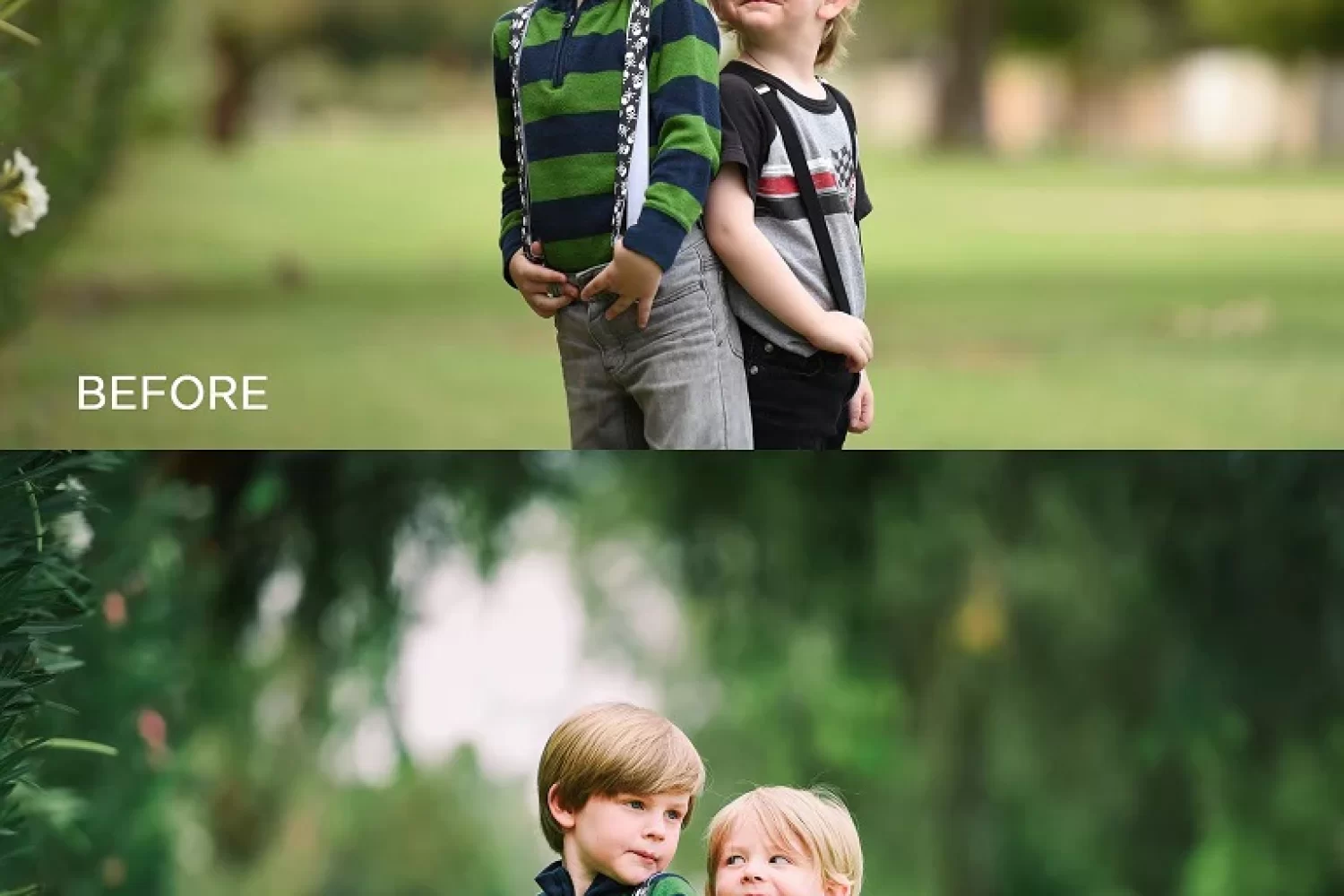
Intentionally Overexposed Image

Here's an overexposed portrait. Can it be saved?! See the results below.

You probably don’t need to read this article because you already shoot in RAW mode on your DSLR. And I’m sure you’re thinking, “Are there really people that still shoot only JPEGs?” Crazy, isn’t it?  You’re not still reading this, are you?  Oh no, don’t tell me you’re not shooting RAW files.  Have a seat and let’s talk.

A RAW File (NEF files on Nikon and CR2 files on Canon) is a big scary mass of information (BSMI) (strictly my own nomenclature so don’t Google it), which if not understood can sit on your computer for long periods of time without ever turning into easy-to-work-with images.  I certainly understand why some people might be scared off by them.  But these BSMI are the best feature your DSLR has for proper exposure, if you just give them a chance!

So what is a RAW file? Simply put, a RAW file is the unprocessed data captured by your sensor when you take a picture.  This data can all be saved in a RAW file (which leads to a BSMI), or you can forego saving all of that data by compressing the information into a JPEG which is about 1/4th the size of the RAW file.  This means that you are throwing away 3/4th of your image data.  Sounds like a lot doesn’t it? (It is!)  The benefits of RAW files are in your ability to manipulate the exposure and appearance of the image and not in having a file that you can print bigger.  In other words, a RAW file and JPEG will look the same—until you try to manipulate them.  That’s when the JPEG will reveal itself as inferior.

Benefits of saving RAW files in camera:

  • You can save a greater range of exposure.  Did you underexpose a few shots when you were in Australia? With RAW you can just turn your exposure up in an instant.  With a JPEG, it’s time to book another flight back or live with an underexposed image.  Sure, you can do a little tweaking with a JPEG (and I emphasize “a little”).
  • RAW files allow you to preserve color correction information that would normally be discarded by JPEG compression, so you don’t need to worry about white balance before each photo.
  • RAW files have a greater tonal range.  Not to simplify it too much, but would you rather color in a drawing with a box of 8 crayons or a box of 512 crayons?
  • When you make changes to your RAW file, you’re only changing the settings applied to that file and when you export a JPEG from your RAW file, those settings are applied. This means you will still have your original file down the line and not a changed or degraded version.
  • You can export as many JPEGs as you want from your RAW file.  Did an editor call and ask you if you have one that was exposed lighter?  Turn up the exposure on the RAW file and export another JPEG.
  • Want to create an HDR (High Dynamic Range) image but only have one photo to work with? Export three different versions from your RAW image: one light, one mid and one dark image.  Sandwich the layers in Photoshop and make an HDR from one RAW image!

Benefits of saving JPEG files in camera:

  • JPEGs are smaller.
  • You can fit more JPEGs on a memory card.
  • You can take more rapid fire consecutive images
  • They take up less space on your computer.
  • They’re easier to upload and email to people.

Did I mention they’re smaller? I think you get my drift.  JPEGs are bad.  And yes, I used to shoot JPEGs, so I am speaking from experience, but when I shot JPEGs, my Nikon D100, which was released in 2003, had a buffer of 2 RAW files.  That means that I was only able to take two rapid fire exposures before the camera needed time to process them, which meant a delay until the buffer had room to take another photo.  It takes an eternity for the buffer to empty—longer in some cases.  Once I upgraded to a D200 I explored RAW files a bit more and was hooked.  Now I own a D700 and have a buffer of 17 RAW files and rarely hit that ceiling.  I will admit that shooting RAW has made me a lazier photographer exposure wise, since there was a time when I labored over metering multiple zones of a scene to ensure a perfect 4×5 transparency.  (So, I believe I’ve earned a little laziness.)

Corrected Exposure JPEG vs RAW file

Exposure adjusted in Lightroom. On the left is the JPEG and on the Right is a JPEG made from the RAW file. See the difference?

With all of the benefits, what’s holding you back from shooting RAW files?  “Memory is too expensive.”  Not anymore.  You can buy an 8 gigabyte card for $40 or less.  “RAW files are too hard to print or email.” I’ll give you that one.  You can’t send a RAW file to most labs to print or email them out to your friends, so they can be much harder to handle, but with the popularity of DSLRs, even free programs like Picasa are able to import RAW files, and they export easy-to-work-with JPEGs that you can send to a lab, email, or post to Facebook.  But there’s one difference… they’ll be properly exposed.  And, isn’t being able to rescue those five perfect images you took on your once-in-a-lifetime trip worth a $40 memory card and a little extra work?

{ 26 comments… read them below or add one }

Mike February 19, 2010 at 12:40 AM

Good explanation of RAW… …but RAW images still makes my computer slow to a crawl!

Reply

mukul soman March 1, 2010 at 9:15 AM

Nice input Okello! I do believe that RAW Rocks! Jpeg may come in handy only in certain situations, like photo journalistic/ event stuff where sometimes turn around time is critical. But then you have very less margin for error!

Reply

Robert Broderick March 2, 2010 at 3:46 PM

So what are some of the ‘other’ options for processing RW files. Does PS CS3 handle them. Do I need a plugin?

Reply

Okello Dunkley March 2, 2010 at 5:37 PM

Hi Robert,
As far as processing you want to use a program like Aperture or Lightroom. I’m assuming that you’re coming home with lots of images to process and export as JPEGs. Adobe Photoshop is more of a get under the hood with one image type of program and you certainly don’t want to have to process 1000 RAW files from your two week vacation in Photoshop. As of this writing, you can buy Aperture for $179 and Lightroom for $229. That’s a small price to pay considering those photos will be on your wall or in a magazine for a long time. The bottom line when you buy something photography related, make sure you’re going to wring your money out of it. If you process 1000 RAW files from your trip, you’ll pretty much have your money’s worth right there. One of my friends that just bought a DSLR and is about to have a baby called me and said that $200 seemed like a lot for editing software and I told him he’ll have his money’s worth by the time the baby is 3 months old!

Reply

RaLpH March 2, 2010 at 6:46 PM

If RAW images make your computer “slow to a crawl” then you really need to get a new computer…. Seriously… Seriously!!!

I sometimes process RAW images on my NETbook which has a Z-Series processor.. Its slow but I not “slow to a crawl”

BTW, the Z-Series processor is pretty much the sloooowest processor in a notebook…. Mine gets a Windows 7 performance index of 1.2… By comparison, my main desktop is a Core i7 with an index of 7.4….

Seriously… If this happens, Its time for a new computer… Seriously…

Reply

art perera March 4, 2010 at 2:42 PM

Great article. I’ve been shooting Jpegs for years and you sold me on shooting RAW. I own a D3 and there’s no excuse for not shooting RAW.

Reply

Okello Dunkley March 4, 2010 at 3:14 PM

Really Art?! That’s like telling me you have a Ferrari, but you’ve never driven it over 60mph. Glad to hear you’re on the RAW bandwagon. You’ll never look back.

Reply

JB Shmults March 6, 2010 at 7:06 PM

Just one quick comment: I have another home-made acronym for you: BSM (without the i) – Big Stupid Misconception and really, really bad advice to sell RAW files as the best exposure tool. Exposure is done before you push that button and I rather have a well-exposed JPG than an under- or over-exposed RAW. You only capture so much information and yes, RAW can save your day on occasional mistakes and allows you to push up or down a little, but foregoing proper exposure (being lazy as you called it) is really an unsmart approach, because you will spend a LOT more time tweaking an image (in addition to the excessive load and processing times of RAW files) than you would have spend in the field properly exposing….

But I’m sure you all knew that (making that advise even worse)…

Reply

Okello Dunkley March 6, 2010 at 8:45 PM

JB, you really need to step back and think of who this post is aimed towards.  It’s aimed towards DSLR users that don’t use raw. If they are not using RAW, then they are probably not nailing their exposure every single time. Will you agree with me there? This is aimed towards people that want to take great photos. Period.

I have been driving a car for over 20 years now (scary thought!)  Do I drive as carefully as I did when I was 16? No, my hands aren’t at 10 and 2 and egads you might even catch me once or twice with only one hand on the wheel.  That’s because I feel comfortable driving.  It’s the same way when I’m taking photos. I’ve been doing it since I was 6 years old. I’ve metered 4×5 transparencies, I’ve used the zone system when I had to; I don’t have to anymore. I’m enjoying photography and I’m after the spontaneous shot. If that means I miss my exposure by a 1/2 stop and can simply turn up a RAW file when I get home so be it. I’ll have a perfect JPEG AND get the spontaneous shot. You go ahead and spend the extra 30 seconds tweaking your exposure so you can have more time to watch TV when you get home.

Reply

Diane Bergander March 7, 2010 at 1:44 PM

You need a new computer! I had the same experience as you and bought a new very fast computer and working in RAW in now a dream and very quick!

Reply

Mike March 17, 2010 at 12:00 AM

As a wedding photographer, I always shoot RAW, as a photographer I am always trying to get the best exposure out of every shot, but that does not always happen there are variables that happen. When you are trying to get that only going to happen once during the wedding shot I want all the best chances to get a great photo. When you are in a fancy hall and the ceiling has chandeliers and mirrors and you are someone who uses a bounce flash there are bound to be a few funky looking pic and Adobe Photoshop CS4 and RAW converter are great. Another idea is to shoot both RAW and Jpeg. I have the Canon 50D and I have 6 JPeg sizes and 3 RAW sizes and you can shoot both and unless you are shooting sports and need speed you will be fine

Reply

Rachel March 22, 2010 at 2:43 PM

I’m going to Egypt in a few weeks and I’d like to try shooting RAW, but I’m concerned about what kind of memory cards I should get and how many? Usually when I travel I shoot about 1000-1500 shots, sometimes more. Will I be able to shoot as quickly as when Im shoot in JPeg? Will I have to take my computer to download the photos every night?
Sorry for so many questions, but your article convinced me to try shooting RAW.
Thanks….

Reply

Okello Dunkley March 22, 2010 at 4:27 PM

Hi Rachel, glad to see you’ve made the switch. Regarding how fast you can shoot, that depends on your camera. Buffers vary by camera. A Nikon D90 has a buffer of 9 photos in RAW mode, a Canon 50D has 14 and a D700, 17. That means I can shoot that many rapid fire shots before the camera needs to stop shooting to process. Keep in mind that the buffer will be going back up as you shoot depending on how fast you’re shooting. You can find your buffer number on your camera when you look through the viewfinder on the bottom right. On Nikon it appears like this [r09] when you depress the shutter button halfway. On Canon it appear just as a number so you will just see 14.

So how many photos can you fit on a card? My D700 has a 12MP sensor and shooting RAW I can fit over 700 on an 8 Gig card. I’m not sure where you live, but I’m going to guess that you’re spending a lot of money to get to Egypt. With that said another 8 Gig disc won’t add much more cost to your trip relatively speaking and considering you will end up with some wall worthy photos, I would feel good about spending $50-100 (maybe not even that much) on some extra memory. That way, you can leave the laptop at home and have more time to enjoy everything. You could even edit the obvious rejects when you get back to your hotel each night and be able to do fine with two or three 8 Gig cards. I hope that helps!

Reply

Rachel March 23, 2010 at 5:01 PM

Thanks so much for the response. I was definitely going to get more memory. In fact, I’m on my way to the camera store tonight! by the way, I have a Sony A200 and I wasn’t able to find the buffer number.
Thanks Again!

Reply

Riza April 6, 2010 at 8:39 PM

Thanks for the explanation! Do you shoot RAW during a fast paced wedding? or do you stick w/ RAW? I have a D200 now and thinking of upgrading to a D300, or is it better to get a nice f/1.4 lens for about the same price as the D300?

Reply

Jack Harwick July 2, 2010 at 9:04 PM

Okelo,

While everything you say is true, I still disagree with your conclusion, and before you dismiss me as a “knownothing”, I should tell you that I was teaching photography in the public school system, and selling my photographs over fifty years ago.

Raw is one of many tools that can be used to make images. If you believe that using more sophisticated tools automatically makes you a better photographer, then it is time for a reality check. My local camera club has over three hundred members, many with high end Canons and Nikons who shoot raw and post mediorce photos compared to the jpgs from my little Olympus. I.woluld like to remind you that Ansel Adams camera was a wooden box, and Michielagelo created his art with a hammer and chisel.

I use tools that work for me, and I don’t assume that others are better or worse just because they use different tools. photography is about vision, imagination, and technique, and it would be boring if we all did it the same.

Jack Harwick

Reply

Okello Dunkley July 2, 2010 at 9:25 PM

Can you expound a bit? I’m not following which part you disagree with. My conclusion, in my opinion, is if you shoot in RAW you are able to do more with your files during post and can potentially save mistakes and that can’t be disputed.

Reply

Doom August 10, 2010 at 1:11 AM

It’s a simple as this. JPEG = Slide film. RAW = Negative film. With slide film you need to nail the exposure. Most photographers (we’re including consumers here as well, not just professionals) use(d) negative film. The flexibility is a huge selling point.

I exclusively shoot RAW and have not looked back since.

Reply

Paul Page November 18, 2010 at 1:56 PM

Okello—This is the first time that I have looked at your website and it seems forward of me to just jump in with an opinion without knowing much about you but…..shooting raw seems out of date. The new in camera processors in this generation of Nikons (including the D700 and D90) are fantastic and produce the color, contrast, and sharpness straight out of the gun in JPEG that took me a lot of time to produce in RAW in my D80. This is the major reason to upgrade to a newer Nikon. You can skip all of that mucking around in RAW when you come home from Thailand with 1000 shots. I urge everyone to shoot some images in RAW and JPEG and compare the results and make a decision for themselves.

Reply

Okello Dunkley November 18, 2010 at 2:02 PM

Hi Paul, everyone is welcome to their own opinion, but if shooting in RAW was good for nothing but putting off my white balance decisions I would still do it. I don’t ever have to worry about white balance. I make that decision when I’m at home in front of my beautiful calibrated MAC screen. Is your camera’s LCD color calibrated? No? And you’re judging white balance on it?! Yikes!

If I were shooting JPEG, how would I be able to underexpose my image when I don’t have enough light to get a fast enough shutter speed and then pull that light back in with lightroom?

If you trust your camera to tone map a bunch of numbers into an image that will hang on your wall for years, you’re really putting too much trust into your camera.

I’m glad you found my blog. Now if you end up taking my class you’ll actually see how much you’re missing by shooting JPEGS!

Reply

george January 6, 2011 at 10:30 AM

Sure Raw has all the juice and is good if you have to further tweak the image “if” the user knows photoshop very well . The key to capture the best quality is to nail the exposure from the start and in the camera because with 1 or 2 stops under-exposure nothing will bring those skin tones to perfection even raw does not have the power to do that .
The biggest mistake this days is that most of the people focus on shooting raw thinking that can be fixed later WRONG ! learn how to nail the exposure from the start and try to understand how light works outside or in the studio .

Reply

Okello Dunkley January 6, 2011 at 12:03 PM

Well certainly everyone is entitled to their opinion. I just have finer taste when it comes to my images. Those of us that totally get exposure and can nail it still want more control over our final image. If you tell 100 people to tell you what the color red looks like, you will have 97 different shades of red. Same thing with your camera converting a bunch of numbers into colors. Do you want more control when you change a bunch of numbers into colors or do you want to lock into what that single DSLR thinks red is? I’ll let my computer do the heavy lifting and that way if I don’t like the way red was mapped, I can try it again, and again and again. The JPEG version would be relying on one taking that one person’s opinion of what those colors look like, lock those in and throw away the extra information. And tone mapping is just one aspect! There’s also noise reduction, sharpening and white balance. You really trust one person/camera’s judgement?! You guys can never convince me to shoot RAW, but I love to see you keep tryin. :-)

Reply

george January 6, 2011 at 11:11 PM

You can adjust the white balance while watching the results in real time in Live View mode , no problem-o with White Balance while shooting jpeg .
Also if you want the real colors of your camera sensor to capture TRUE colors blue,purple ,yellow , green the only solution is to get the ColorChecker from Xrite or the expensive SG . The canned profiles of your camera software or Photoshop is not the real or true colors , forget those profiles for real colors .

Reply

Terri January 29, 2011 at 1:32 PM

Switching from JPG to shooting RAW was the best things I have done to have more creativity and still have my orginial files. I have found it also helps me to have more options to change my lens in lightroom because at this point I have not been able to purchase those really cool lens such as the different Fisheye lens… Shooting RAW gives me the options to play with the many lens offered in the program. When I am just playing around at home, I will use JPG but I will switch it back to RAW in a second! And when I want to get the most professional shots that I can out of my D90 I shot in Raw. I have not had the opportunity to take on of your classes yet but I will do my best to be at the one in Norfolk in March. Your little tutorials have been awesome and I thank you for sharing! God Bless!

Reply

Christina October 11, 2011 at 10:20 AM

Okay..I just bought an Olympus E-620…I have taken it to California, Oregon, Santa Fe, New York…all in JPEG!!! :( Although I did shoot about 5 images of each object I thought was a framer, in different exposures of course! So..my question…what is the best software for manipulating RAW images?? Photoshop? Adobe?? Lightroom? Aperture? I am SO new to digital. I finally converted over from film (sigh…I do miss film :) ) SO I need some professional tips from you guys! Thanks! Christina

Reply

Okello Dunkley October 11, 2011 at 10:50 AM

Hey Christina, Welcome to digital! The software question is a matter of opinion, but Aperture and Lightroom are the frontrunners when it comes to working with RAW files. Of those two, I’m a big fan of Lightroom, but both will do the job. Download a free 30-day trial of each and see which one you like best.

Reply

Leave a Comment

Previous post:

Next post: